Features
Everything Quixplain does, from the page you're reading to the game you play with it.
Select text and click the Q. Open the side panel to chat about the page. Keep what matters in your library, then turn it into a document, a quiz, a live game or a trail through the woods.
NewQuizzes, live games and nature trailsUnderstand· In your browser
Select anything. Get what it means, here.
Click the Q next to any selection for an explanation that fits the page. Hold it for the quick-action bar, with the tools you choose.
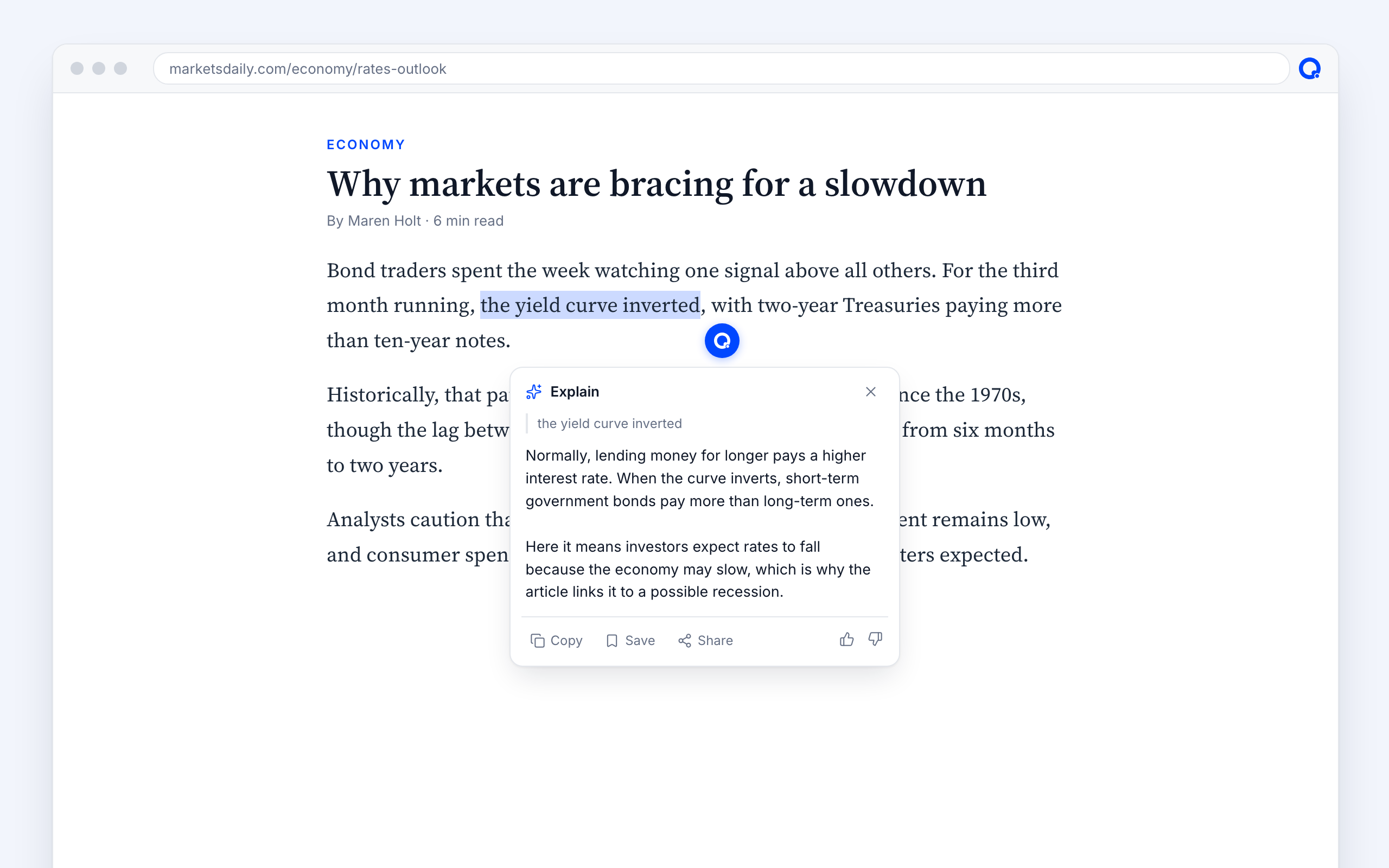
Explain
The meaning in context: the sense the page intends, slang and in-jokes included.
“the yield curve inverted” → what it is, and why the article links it to a recession.
Translate
Into your language, with idioms rendered as a native would say them.
„Tomaten auf den Augen haben“ → “to be blind to the obvious”.
Fact-checkPro
A verdict with sources you can open.
“The Great Wall is visible from space” → Inaccurate, with NASA as a source.
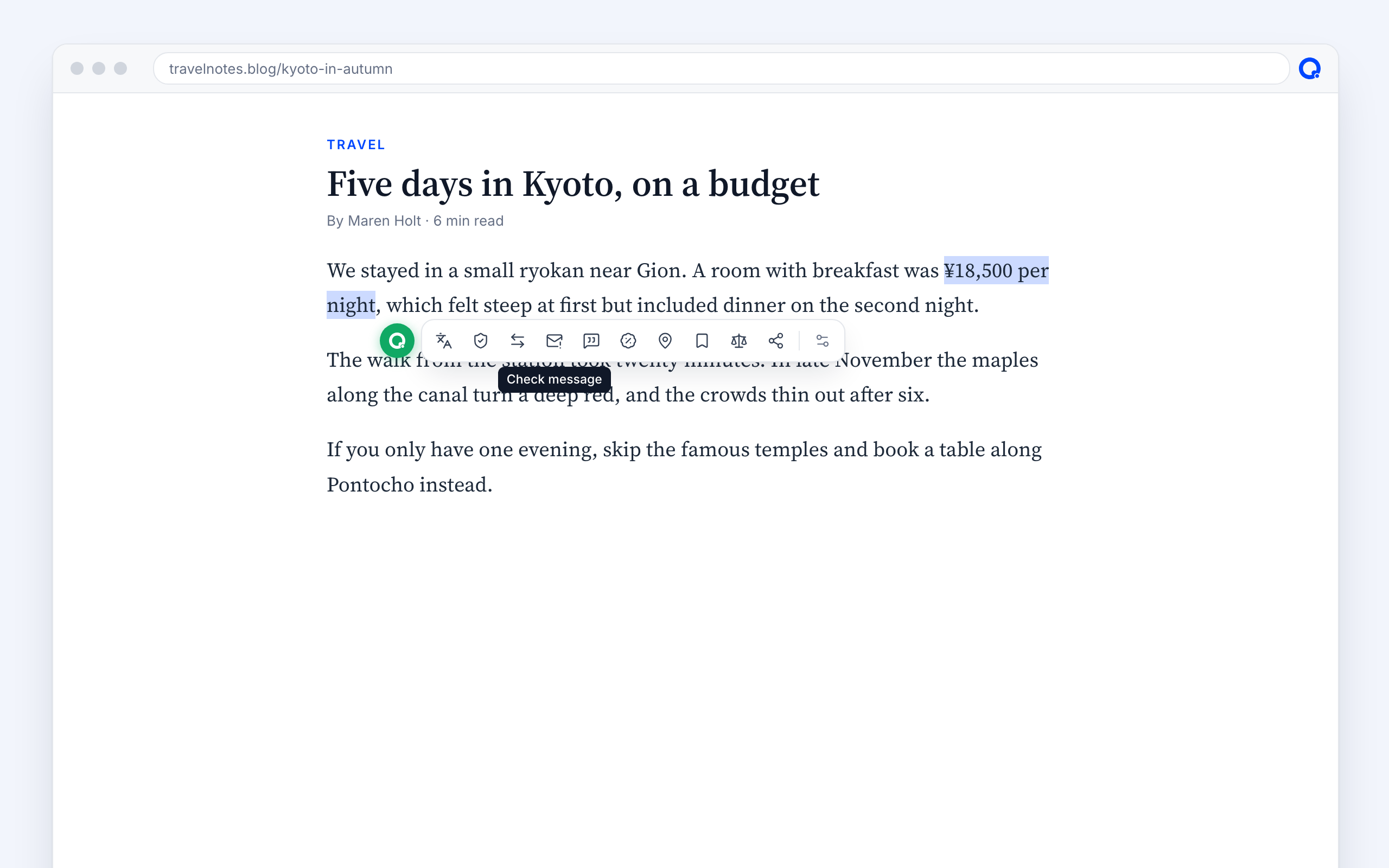
Convert
Prices, units, sizes and times in your currency and system. Shows up only when there's something to convert.
“¥18,500 per night” → about €115.
Map
Select an address and see it on a map, with directions.
ReviewsPlus
What people say about a hotel, place, product, book or app, with ratings per source.
Find better pricePlus
The same product in other shops, with prices checked on each shop's own page.
Ask and comparePlus
Your own question about the selection, or how it compares with something else.
Deep researchPro
A passage or a whole page researched across the web, written up as a sourced report in your library.
Chat· In your browser
Chat about the page you're on.
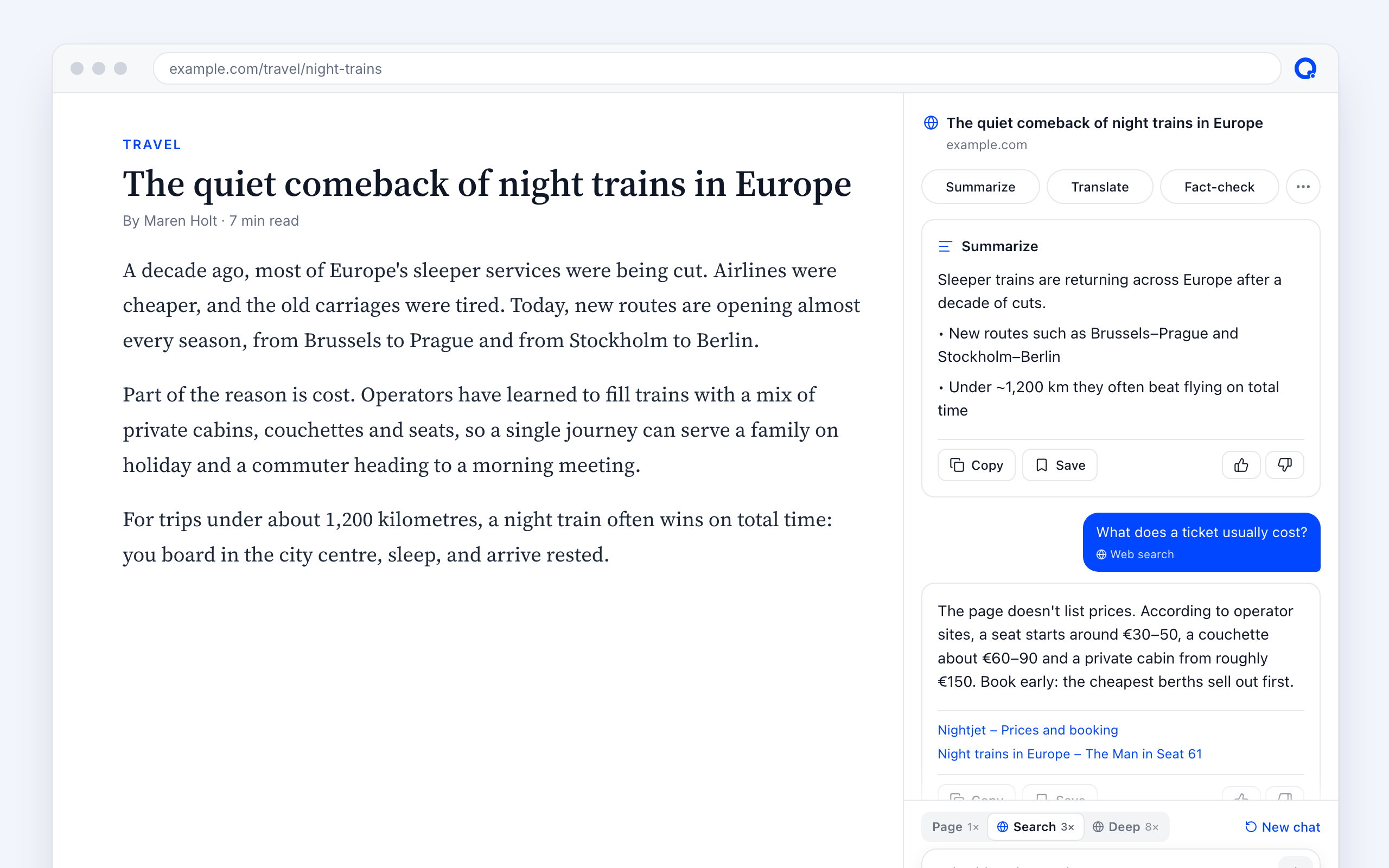
Open the side panel and ask. Summaries, translations and fact-checks join the same conversation, so follow-up questions know what came before.
Follow-up questionsPlus
The conversation remembers earlier answers, and says when the page doesn't cover something.
Summarize, then “What does a ticket usually cost?”
Boost with web searchPlus
Page, Search or Deep: let the answer reach beyond the page, with sources.
Whole-page actions
Summarize, translate, fact-check or research the page in one click, and save the answer to your library.
Messages· In your browser
Answer email and chats with confidence.
In Gmail and Outlook, check an email before you trust it. In Slack, Discord, Teams and WhatsApp, get the thread in plain words. Then let Quixplain draft your reply.
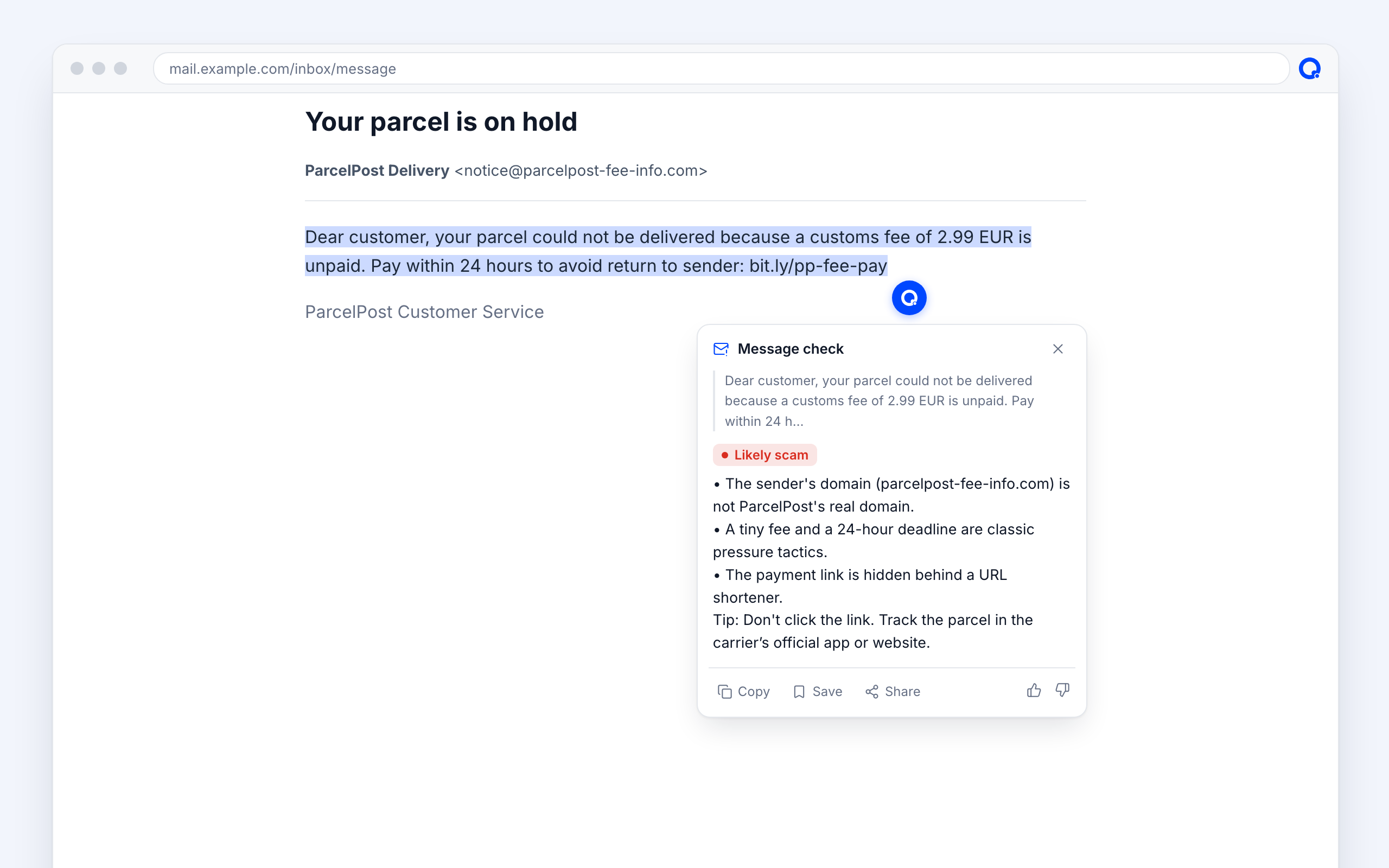
Check this email
Looks fine, Be careful or Likely scam, with the reasons: sender, links and wording.
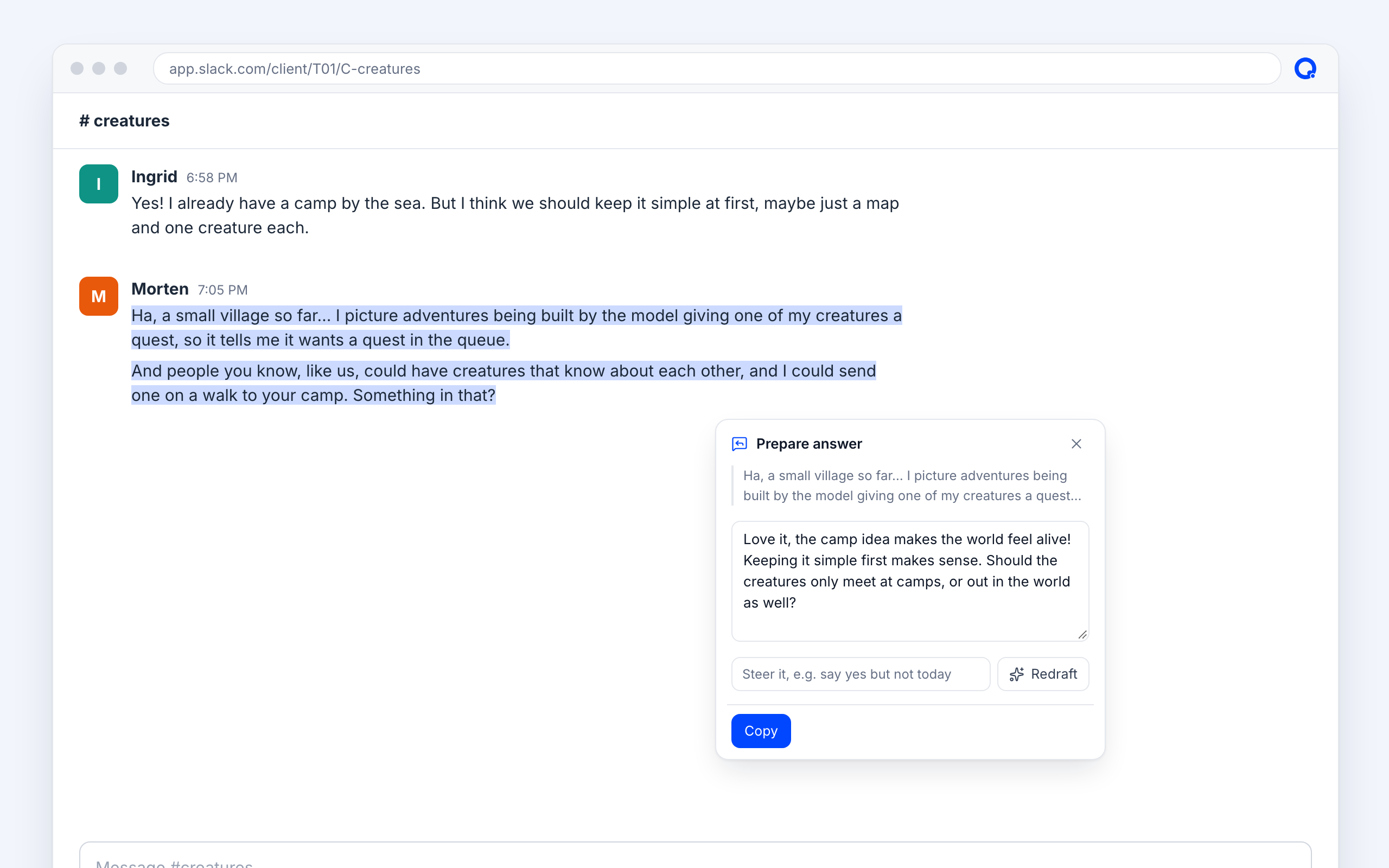
Prepare answer
A polite, specific reply in the conversation's language, signed with your name. Steer it with a few words, then insert it. It never sends for you.
“yes, but only 15 minutes” → a reply that says so, kindly.
Follows the thread
Reads the conversation on screen and knows which messages are yours.
Read and listen· In your browser
Read the article, not the page around it.
Reader view strips menus, ads and players and lets you set the size, font and colours. Or sit back and listen.
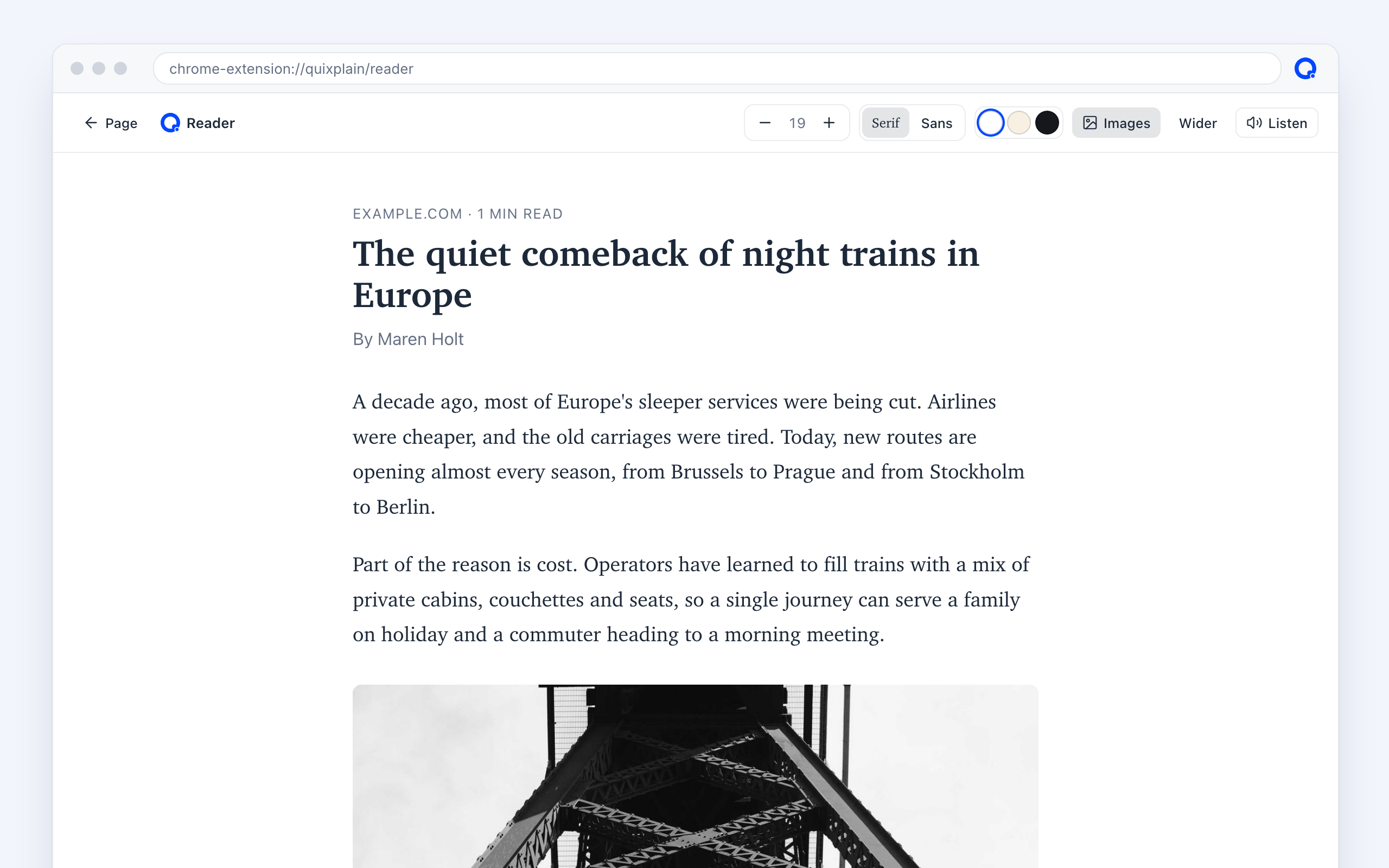
Reader view
Serif or sans, light, sepia or dark, wider or narrower, images on or off.
Read aloud
The page or a summary, in your language or the page's, with your browser's own voices.
Outline
The page's headings as a table of contents. Click to jump.
Links
Every link in your selection or on the page, ready to copy as a list or Markdown.
Video· In your browser
Watch less, get more out of videos.
On YouTube, Quixplain reads the video's transcript, so you can summarise it, chat about it or fact-check it, and keep it in your library.
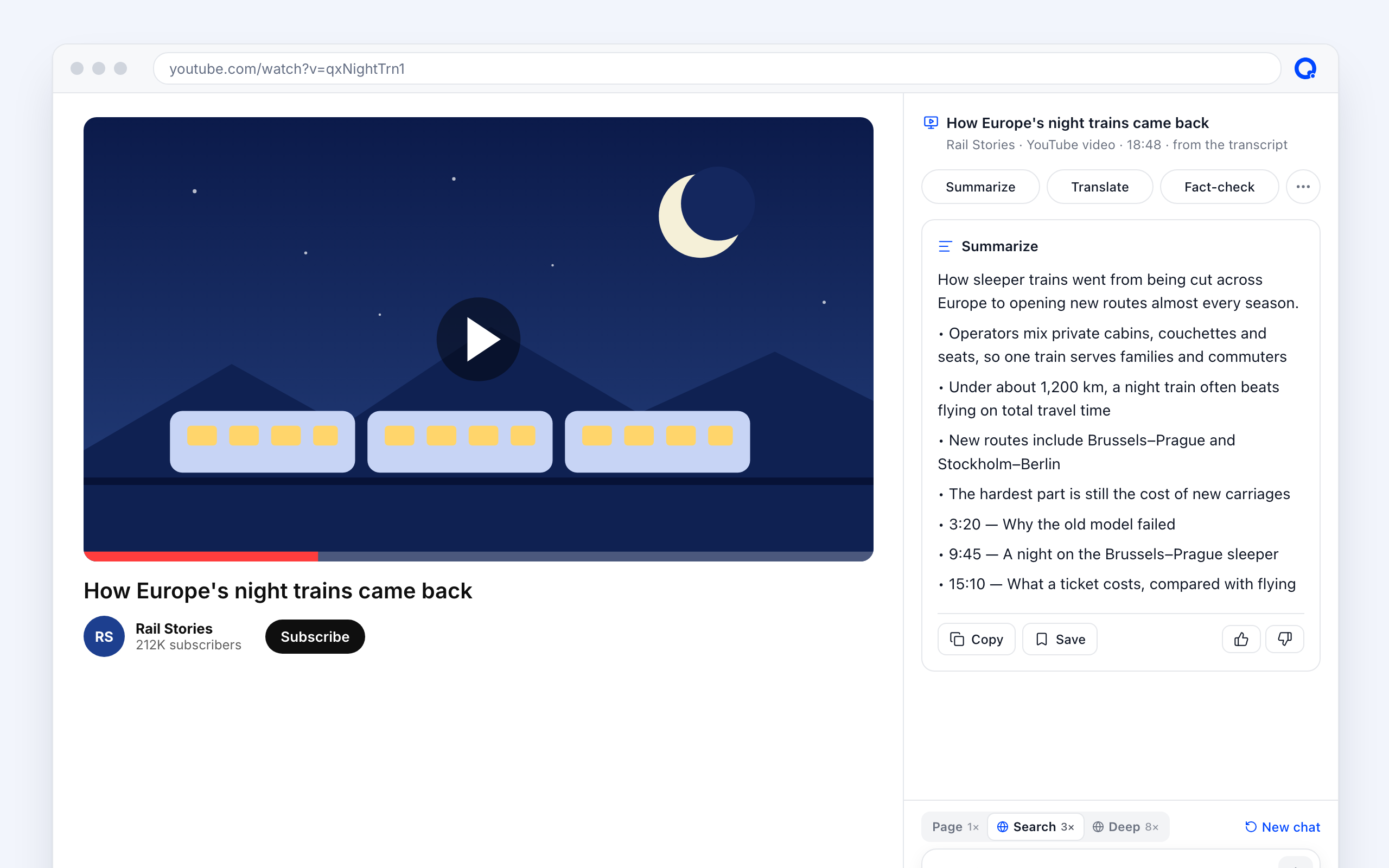
Video summaryPlus
What is said in the video, from its transcript, with the key moments by timestamp.
A 19-minute video → the gist, five points and “9:45 — A night on the sleeper”.
Chat about the videoPlus
Ask follow-up questions, translate or fact-check what was said, not just the page around it.
Save videos
A video card in your library, with thumbnail, channel and length. Save it at the minute you're at to pick up later.
Play in the library
YouTube and Vimeo play right in the card, from where you left off. Nothing is downloaded.
Tools· In your browser
Take what you need from any page.
Logos, icons, tables, colours, fonts and text inside images, without opening developer tools.

Logos, images and icons
Hover any logo or icon and take it as clean SVG or PNG, with its colours. Recolour it, or keep it in your library.
The Aiakaki logo on aiakaki.com → an SVG with its three neon colours.
Tables
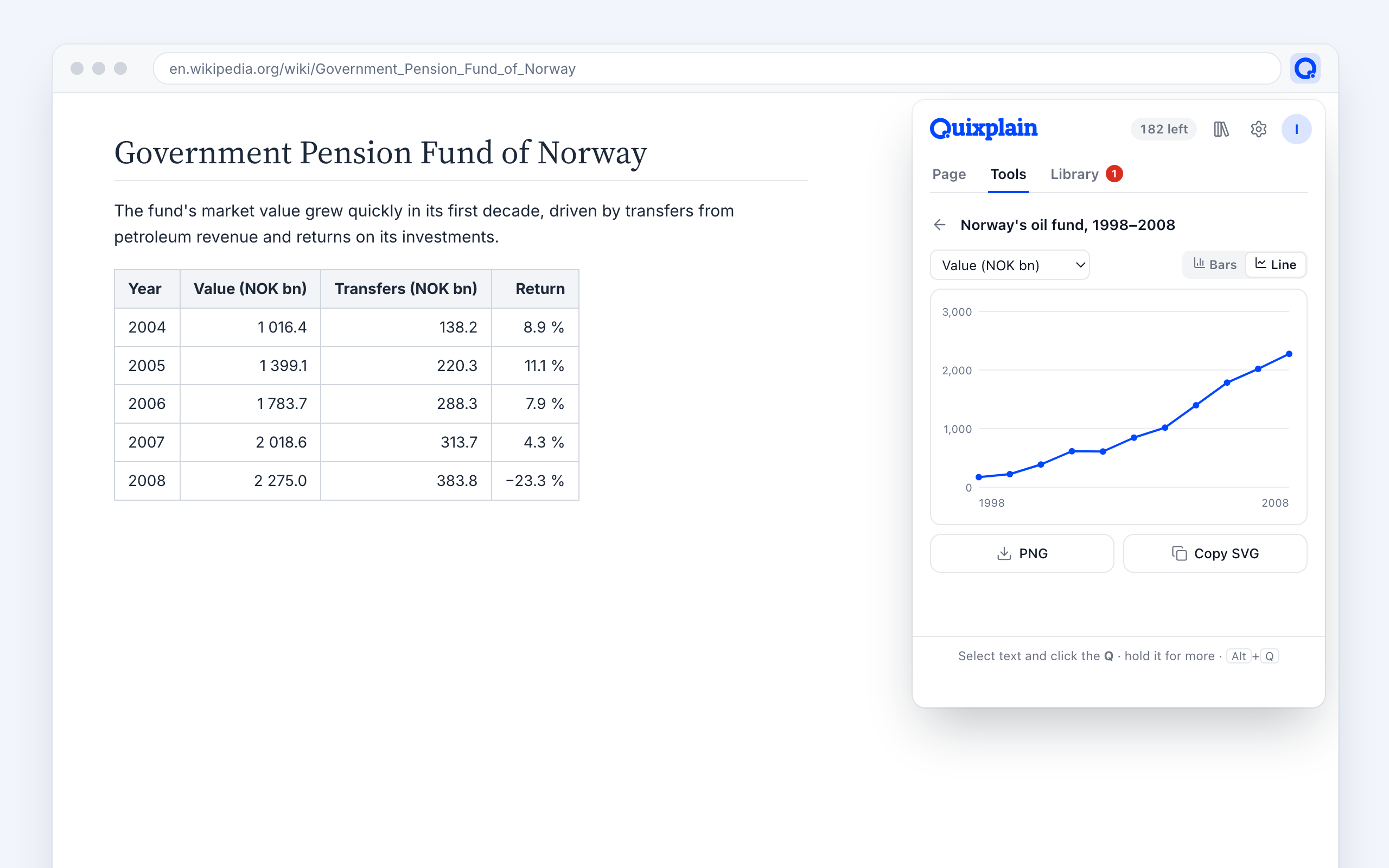
Copy straight into a spreadsheet, as CSV or Markdown, chart a column, or get what stands out explained.
Snapshot
An area, the screen, or the whole page from top to bottom.
Text from image
Drag over an image, video frame or scan to get its text, then translate or save it.
Pick color
An eye-dropper with a magnifier. HEX, RGB and HSL, copied.
Measure
Hover any element for its size, padding and margins.
Font
The font actually rendered, with size, weight and colour. Copy as CSS.
QR code
Open the page on your phone, without trackers in the link.
Library· Your library
Keep what you learn, and build on it.
Everything you save lands at quixplain.it: in folders with sections and quizzes, as tiles or a list, ready to share.
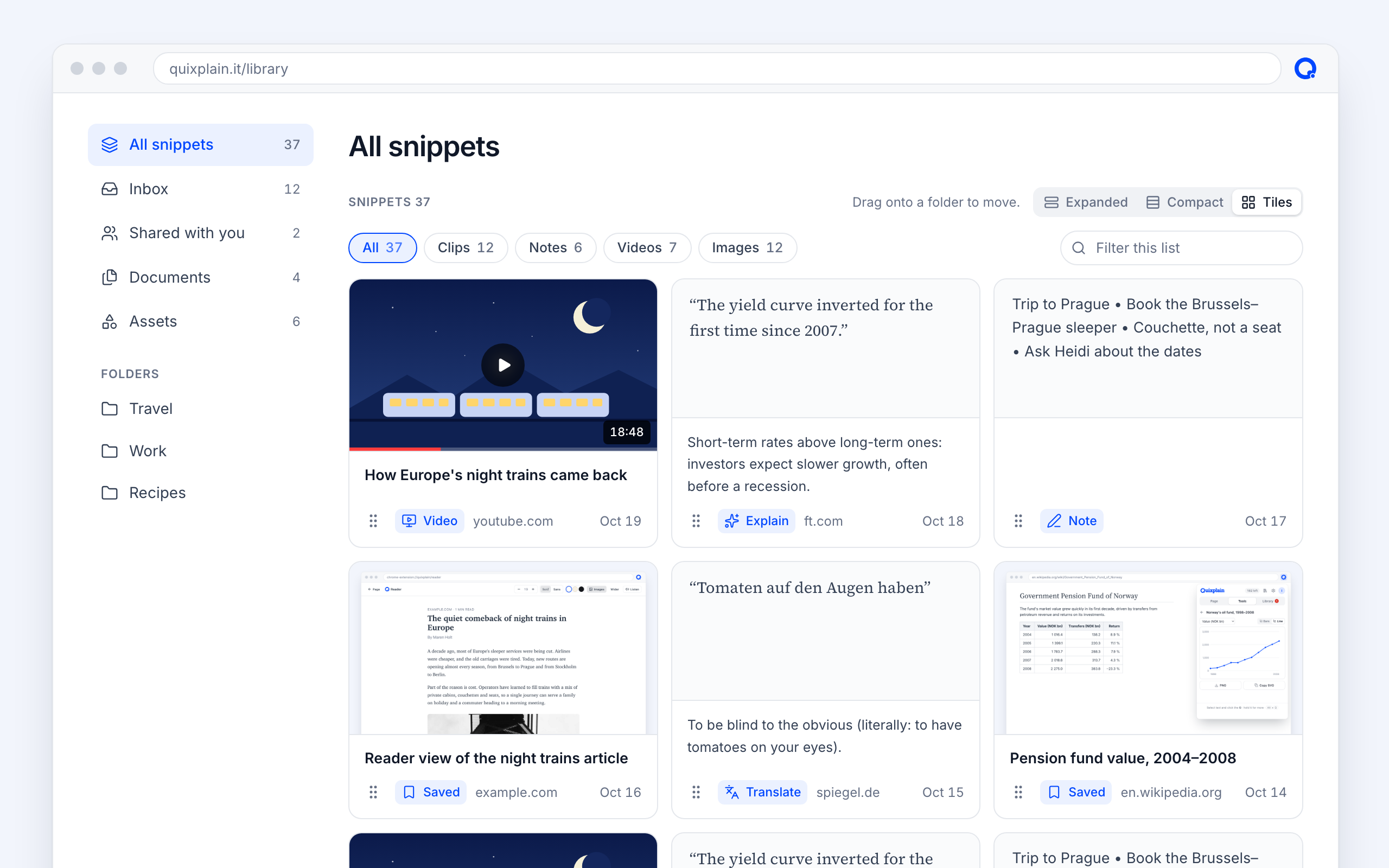
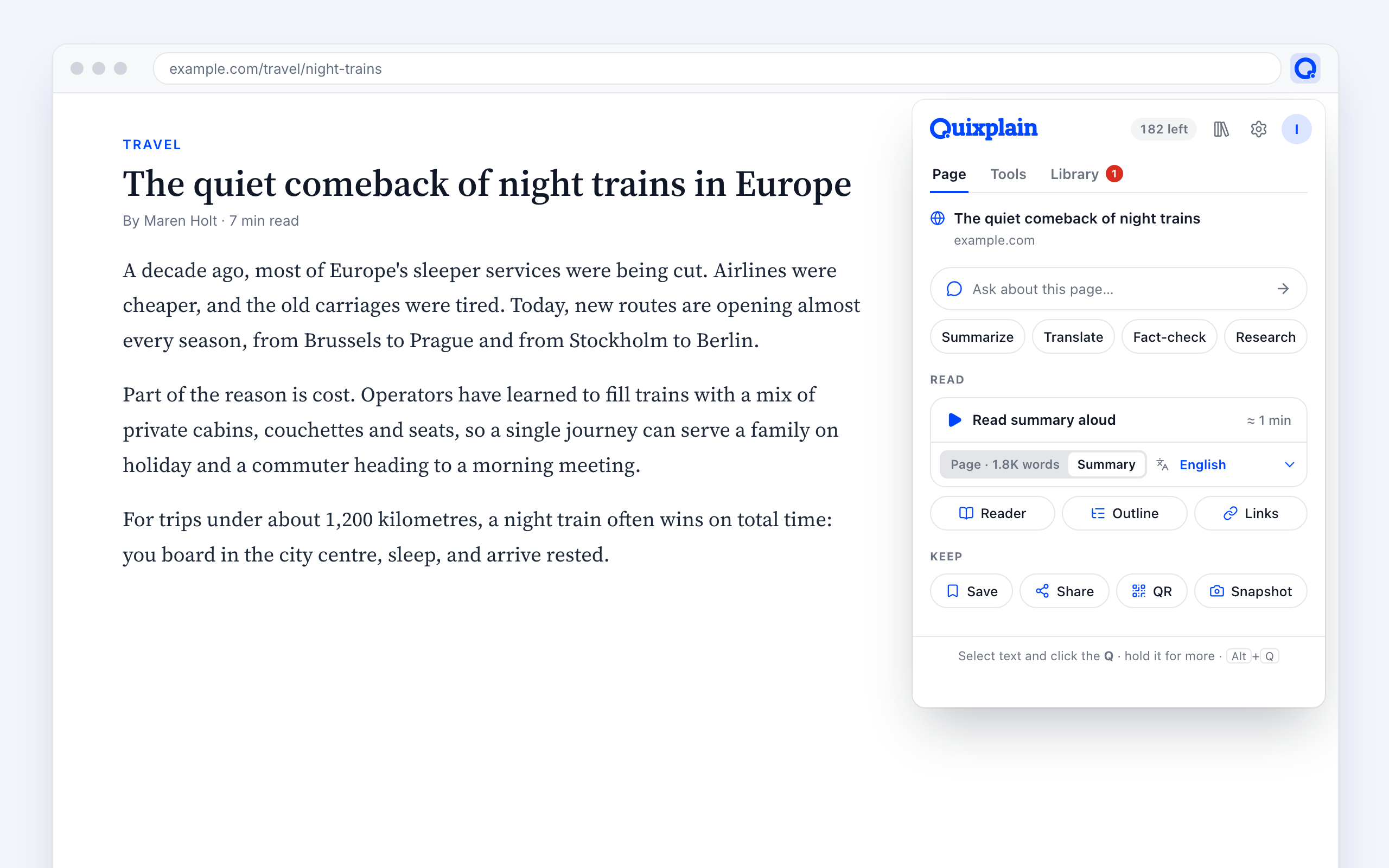
Home
A dashboard of what's going on: live games, latest saves and quizzes, today's requests, and your community stats.
Folders, sections and quizzes
Each folder holds sections and quizzes, all opening and closing in the sidebar. Add one with a single +.
Tiles, filters and search
Tiles, a list or compact rows; filter by clips, notes, videos or images, and narrow it as you type.
Linked assets
Logos and pictures live once, at the top. Folders and pages hold linked copies: change the original and every copy follows.
Recolour the logo once → it changes in all six pages that use it.
Make one your own
Change a copy and it lets go of the original, while the copies under it follow the new version.
Share with friends
Anything you saved, a folder or a section, to view or to edit together.
Upload or import
PDFs, Office files and pictures straight into a folder, or plain copies of anything from Everything.
Choose what the extension offers
A switch on each folder, section and quiz decides whether it's offered as a place to save to.
Save from anywhere
One click from the Q, the popup or a snapshot, and any answer in the side panel.
Create with AI· Your library
From a folder of clips to a finished document.
Pick a layout, tick what goes in and say what it's for. Quixplain writes it: cover, contents, chapters, pictures and sources.
A guide
Night trains of Europe
Routes, cabins and what a ticket costs
Contents
- 1Why sleepers came back3
- 2Picking a route7
- 3Cabins, couchettes or a seat12
- 4What it costs18
- 5Sources24
Made from 23 clips, 6 snapshots and 2 videos in the folder Travel, with the Guide template.
TemplatesPlus
Report, Guide or Book. The folder gets the layout's parts as drop zones, so you decide what goes where.
Choose what goes in
The folder's own items and each section, ticked by default. The language and a note on who it's for.
Illustrated
Your snapshots and pictures become the document's illustrations.
Print or share
A clean, printable page, filed in the folder it came from.
QuizzesNew· Quizzes and games
Turn what you read into a quiz.
Save straight into a quiz while you browse. Let Quixplain draft the questions, or write them yourself, then make it look the way you want. Making quizzes is part of Plus; playing is free for everyone.
%22%2F%3E%3Ccircle%20cx%3D%22510%22%20cy%3D%2296%22%20r%3D%2244%22%20fill%3D%22%23ffe08a%22%2F%3E%0A%3Cpath%20d%3D%22M0%20250%20Q160%20190%20320%20240%20T640%20220%20V480%20H0Z%22%20fill%3D%22%239fd3a7%22%2F%3E%0A%3Cpath%20d%3D%22M0%20300%20Q200%20250%20380%20300%20T640%20290%20V480%20H0Z%22%20fill%3D%22url(%23g)%22%2F%3E%0A%3Cpath%20d%3D%22M300%20480%20C320%20420%20360%20380%20330%20330%20C310%20300%20340%20285%20360%20280%22%20stroke%3D%22%23e9d6a8%22%20stroke-width%3D%2234%22%20fill%3D%22none%22%20stroke-linecap%3D%22round%22%2F%3E%0A%3Cg%20transform%3D%22translate(60%20300)%20scale(1.2)%22%3E%3Crect%20x%3D%22-6%22%20y%3D%220%22%20width%3D%2212%22%20height%3D%2240%22%20fill%3D%22%236b4a2b%22%2F%3E%3Cpath%20d%3D%22M0%20-120%20L44%20-30%20H22%20L54%2020%20H-54%20L-22%20-30%20H-44Z%22%20fill%3D%22%231f6b3a%22%2F%3E%3C%2Fg%3E%3Cg%20transform%3D%22translate(140%20280)%20scale(0.9)%22%3E%3Crect%20x%3D%22-6%22%20y%3D%220%22%20width%3D%2212%22%20height%3D%2240%22%20fill%3D%22%236b4a2b%22%2F%3E%3Cpath%20d%3D%22M0%20-120%20L44%20-30%20H22%20L54%2020%20H-54%20L-22%20-30%20H-44Z%22%20fill%3D%22%231f6b3a%22%2F%3E%3C%2Fg%3E%3Cg%20transform%3D%22translate(210%20310)%20scale(1.3)%22%3E%3Crect%20x%3D%22-6%22%20y%3D%220%22%20width%3D%2212%22%20height%3D%2240%22%20fill%3D%22%236b4a2b%22%2F%3E%3Cpath%20d%3D%22M0%20-120%20L44%20-30%20H22%20L54%2020%20H-54%20L-22%20-30%20H-44Z%22%20fill%3D%22%231f6b3a%22%2F%3E%3C%2Fg%3E%3Cg%20transform%3D%22translate(470%20290)%20scale(1.1)%22%3E%3Crect%20x%3D%22-6%22%20y%3D%220%22%20width%3D%2212%22%20height%3D%2240%22%20fill%3D%22%236b4a2b%22%2F%3E%3Cpath%20d%3D%22M0%20-120%20L44%20-30%20H22%20L54%2020%20H-54%20L-22%20-30%20H-44Z%22%20fill%3D%22%231f6b3a%22%2F%3E%3C%2Fg%3E%3Cg%20transform%3D%22translate(550%20300)%20scale(1.4)%22%3E%3Crect%20x%3D%22-6%22%20y%3D%220%22%20width%3D%2212%22%20height%3D%2240%22%20fill%3D%22%236b4a2b%22%2F%3E%3Cpath%20d%3D%22M0%20-120%20L44%20-30%20H22%20L54%2020%20H-54%20L-22%20-30%20H-44Z%22%20fill%3D%22%231f6b3a%22%2F%3E%3C%2Fg%3E%3Cg%20transform%3D%22translate(600%20270)%20scale(0.8)%22%3E%3Crect%20x%3D%22-6%22%20y%3D%220%22%20width%3D%2212%22%20height%3D%2240%22%20fill%3D%22%236b4a2b%22%2F%3E%3Cpath%20d%3D%22M0%20-120%20L44%20-30%20H22%20L54%2020%20H-54%20L-22%20-30%20H-44Z%22%20fill%3D%22%231f6b3a%22%2F%3E%3C%2Fg%3E%3Cg%20transform%3D%22translate(410%20300)%20scale(0.9)%22%3E%3Crect%20x%3D%22-6%22%20y%3D%220%22%20width%3D%2212%22%20height%3D%2240%22%20fill%3D%22%236b4a2b%22%2F%3E%3Cpath%20d%3D%22M0%20-120%20L44%20-30%20H22%20L54%2020%20H-54%20L-22%20-30%20H-44Z%22%20fill%3D%22%231f6b3a%22%2F%3E%3C%2Fg%3E%0A%3Cg%20transform%3D%22translate(250%20360)%22%3E%3Crect%20x%3D%22-10%22%20y%3D%220%22%20width%3D%2220%22%20height%3D%2270%22%20fill%3D%22%237a5230%22%2F%3E%3Ccircle%20cy%3D%22-30%22%20r%3D%2270%22%20fill%3D%22%232f8a4a%22%2F%3E%3Ccircle%20cx%3D%22-40%22%20cy%3D%22-10%22%20r%3D%2244%22%20fill%3D%22%233a9a57%22%2F%3E%3Ccircle%20cx%3D%2244%22%20cy%3D%22-6%22%20r%3D%2246%22%20fill%3D%22%23287c42%22%2F%3E%3C%2Fg%3E%0A%3C%2Fsvg%3E)
Forest trail
Three questions from the walk. Tap to play.
3 questions
Made with
Live demo: tap Start and play.
A quiz from any pagePlus
The extension's own Quiz tab: 5, 10 or 15 questions about the page you're on, in text, pictures or both, with more from the web if you like. Made and published in one go, and shared in the community if you tick it.
An article on night trains → a 10-question quiz, ready to share.
The Quiz tab
Next to Page in the extension: the games running now, join one by its code, your latest quizzes and how they do in the community.
Collect into a quiz
Quizzes show up as places to save to from the extension. Text and pictures both count.
Magic craftPlus
A draft from your snippets: 1–3 questions each, or 5 to 20 in all. 3 or 4 answers, easy to hard, with explanations.
Hand craftPlus
Start from a blank quiz and write every question yourself.
Picture questions
Show a picture for a few seconds, then the answers. Quixplain asks about what a picture shows: who the statue is of, which island this is, who painted it.
Your design
Colour, background, type, corners and a full-screen cover. Text stays readable whatever colour you pick.
Play on any phone
A link and a QR code. No app, no account.
CommunityNew· Quizzes and games
Play what others made. Share what you made.
Quizzes and trails from Quixplain players, free to play on any phone. Start one as a game for your group, or copy it into your library and make it your own. Open in Norway for now.
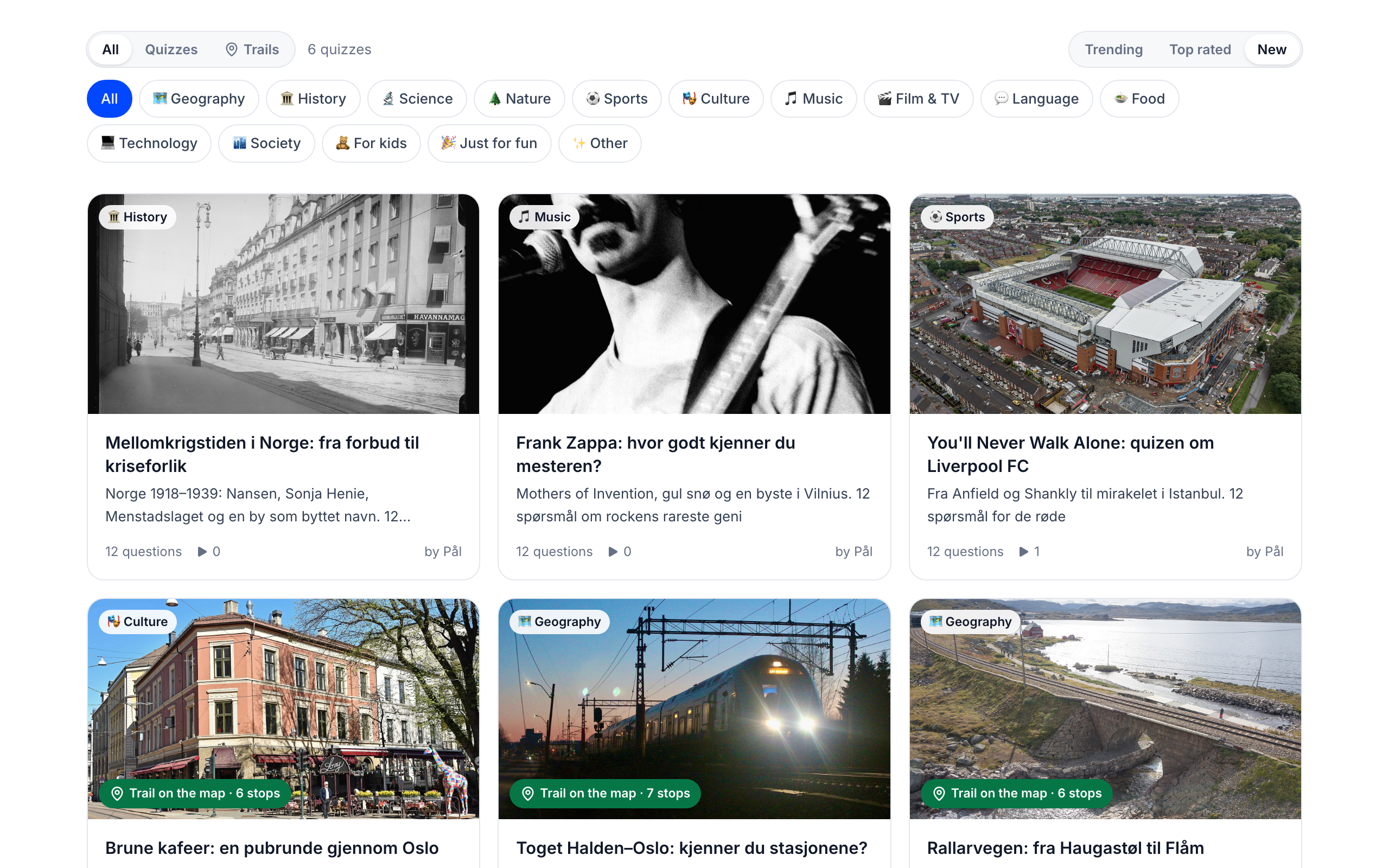
Trending, top rated, new
Sort the way you like, pick a category, search, or show only trails. Trails carry a badge with their stops or posters.
Game master from your phone
Sign in and start any community quiz as a game. Your phone becomes the host screen: code, QR, share, and the podium live. Players need no account.
Copy and make it yours
Questions, pictures, design and trail checkpoints come along into your library, ready to change.
Checked before it's listed
Every share is reviewed by AI first. Pictures go in only if they're openly licensed, like Wikimedia Commons, credited, or yours to share.
Thumbs up, thumbs down
Players rate a quiz when they finish. Ratings shape Top rated and Trending.
Report, moderate
Anyone can report a quiz. Three reports hide it until a moderator looks.
See how yours do
Plays, finishes, thumbs up and copies on your library's Home and in the extension's Quiz tab.
Make your own
Every quiz and game ends with a way to make your own, so one good quiz brings the next.
Live gamesNew· Quizzes and games
Run a game. Watch the podium fill up.
Start a game, put the code on the big screen and let everyone join from their phone. When they finish, they see their place, with the top three on a podium.
K7Q2MX
Ugla
5/5 · 47.9 s
Fjellrev
5/5 · 41.2 s
Blåbær
4/5 · 39.8 s
- 4Trollmor4/552.3 s
- 5Elg3/544.1 s
Start in a click
Open for 5 minutes, an hour, 3 hours or a whole day.
Join with a name
Scan the QR code or type the code, pick a nickname, play. Nobody signs up.
Big screen
Full screen for a projector: the code, the QR and the standings live.
Podium
Ranked by score, then speed. Graded on the server, so it's fair.
Continue code
Every player gets a 4-digit code: with their name and code they carry on on another phone.
Nature trailsNew· Quizzes and games
Take the quiz outdoors.
Put checkpoints between the questions. The next ones stay locked until players get there, by location or by scanning a poster. For school trips, team days and treasure hunts.
On the way · next checkpoint
The old oak
By the stream, past the bridge.
120 mnorth-east
You made it!
The old oak
About 300 years old. Owls nest in the hollow every spring.
3 questions wait here.
Checkpoints between questions
Drop one between any two questions. Each opens the questions after it.
By location
Place it on the map or where you stand, from 25 m to 5 km. Players see distance and direction, and it opens by itself.
QR posters
Print one poster per checkpoint and hang them up. Players scan with their camera to open the next questions.
Time per part
A time limit for the questions after a checkpoint, from when it's reached. Run out, and it's on to the next one.
You made it!
Reaching a checkpoint shows your own text and picture, then the questions waiting.
Ready-made trails
Rallarvegen from Haugastøl to Flåm, the train from Halden to Oslo, and a brown-café round in Oslo: in the community to walk or copy.
Alone or in a game
Play it on its own link, or as a live game with a podium at the end. Progress is kept if the page closes.
Private by design· Trust
Your reading stays yours.
Quixplain only reads a page when you ask it to. Nothing is sold, and your text never trains AI models.
Only when you ask
No background reading of the pages you visit.
Never used for training
What you select and save isn't used to train AI models.
Players stay anonymous
Quiz players pick a nickname. No account, no email.
Try it on the next page you read.
Free to start. Your library, quizzes and games are one click away.